Programming · Games · Life outdoors
Clojure Swing JFrame Introduction
(See my full list of Clojure Swing examples and tutorials at Clojure Swing Interop)
JFrame s are the root windows of all modern Clojure Swing applications. In the old days, there were other options, but polite society does not speak of them.
The visible components that you use in your
JFrame are added to the content pane of the
JFrame . You request the content pane and then add your components to that content frame.
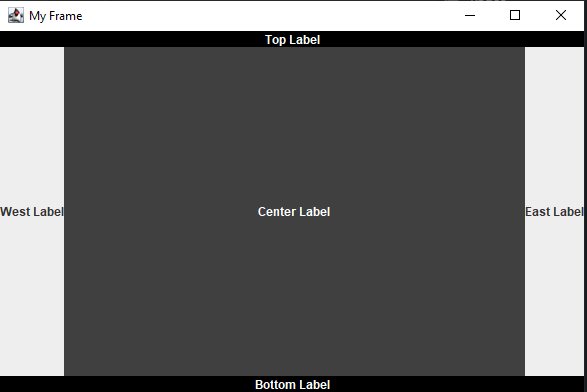
Clojure JFrame Example
Before adding components to a content pane, you need to decide one which of several layouts you will use for arranging your components.
BorderLayout is the default, so we’ll stick with that one for this simple example.
Border Layouts are divided into
NORTH ,
SOUTH ,
EAST ,
WEST , and
CENTER . We are going to use one label for each of the five locations in the content pane’s
BorderLayout . We center the text and change the colors as needed so it is easy to see the locations of each label in the
BorderLayout .
(ns swingproject.core  (:gen-class)  (:import    [javax.swing SwingUtilities JFrame JLabel SwingConstants]    [java.awt BorderLayout Color]))
(defn create-and-show-gui  []
  (let [my-frame (doto (JFrame. "My Frame")                   (.setDefaultCloseOperation JFrame/EXIT_ON_CLOSE))        my-label-north (doto                         (JLabel. "Top Label" SwingConstants/CENTER)                         (.setOpaque true)                         (.setForeground Color/WHITE)                         (.setBackground Color/BLACK))        my-label-south (doto                         (JLabel. "Bottom Label" SwingConstants/CENTER)                         (.setOpaque true)                         (.setForeground Color/WHITE)                         (.setBackground Color/BLACK))        my-label-east (JLabel. "East Label")        my-label-west (JLabel. "West Label")        my-label-center (doto                          (JLabel. "Center Label" SwingConstants/CENTER)                          (.setOpaque true)                          (.setForeground Color/WHITE)                          (.setBackground Color/DARK_GRAY))        content-pane (.getContentPane  my-frame)]
    (.add content-pane my-label-north, BorderLayout/NORTH)    (.add content-pane my-label-south, BorderLayout/SOUTH)    (.add content-pane my-label-east, BorderLayout/EAST)    (.add content-pane my-label-west, BorderLayout/WEST)    (.add content-pane my-label-center, BorderLayout/CENTER)
    (.pack my-frame)    (.setSize my-frame 600 400)    (.setVisible my-frame true)))
(defn -main  "entry point for app"  [& args]  (SwingUtilities/invokeLater create-and-show-gui))
We set the size of the
JFrame to
600 pixels wide by
400 pixels tall, then set the
JFrame to visible equals
true .
Note that we do all our layout in the event dispatch thread by using
invokeLater .